
Cast an Alors on Danse AI duo with two clear roles
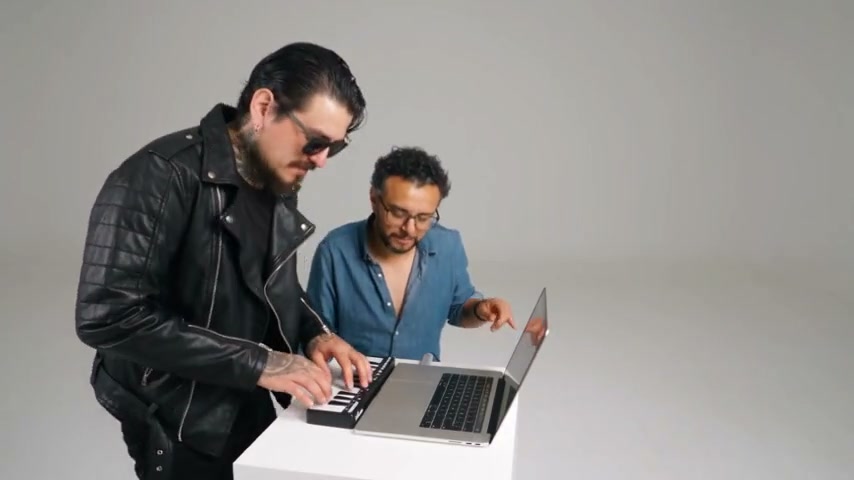
This scene works because the two performers have different jobs. One plays the keyboard; the other reacts beside the laptop and comes toward the camera. Decide who should carry each part before choosing photos, so the joke and interaction remain readable.
Choose the grounded player and expressive partner
Use two individual character photos. Assign the first to the keyboard player and the second to the partner beside the laptop. The partner needs especially clear hair, facial detail and clothing because the reference brings that person closer. The keyboard player’s torso and sleeves should be visible enough to reconstruct playing gestures.
Avoid defining the cast only as left and right: the performers move and framing changes. Role labels remain meaningful during a close-up. Distinct outfits also help you notice a swap when reviewing the result.
Keep the two-person interaction intact
Find your own recording or an authorized editable copy of the performance you want to recreate. Keep the complete interaction, including the partner’s approach and the ending. A crop that removes the keyboard or partner takes away the visual explanation of their roles.
Choose an editor that accepts a video reference and at least two character images. An image-only generator can animate two people, but it will have to invent the interaction. In AI Genjutsu, the dedicated template supplies the reference; check the selected clip preview because a shorter version may omit part of the exchange.
Describe the relationship, not just two appearances
The prompt below keeps the actions with their original roles. It is designed for a custom video-reference editor, where the image numbers must match your attachments.
Recast the two-person performance in @Video 1. Make the keyboard player the complete character from @Image 1, including hair, body and outfit. Make the expressive partner beside the laptop the complete character from @Image 2. Keep the partner’s identity as they move close to the camera. Preserve the playing gestures, reactions, mouth movements, shared timing and final interaction. Keep the white room, table, keyboard, laptop and camera sequence. Do not exchange roles, outfits or instruments, and do not introduce another person.Turn the casting plan into a finished clip
In a compatible editor, preserve the source framing first. You can make a separate social crop after you have a working two-person version.
- Attach the reference and both photos; check that the keyboard player is Image 1 and the partner is Image 2.
- Paste the role prompt and choose a supported clip length. Avoid adding a new location or camera move in the same attempt.
- Generate and inspect the player, partner approach and final shared shot. Check whose hands reach each object.
- If the output is silent, place the same reference excerpt’s audio under it in an editor. Align the first matching action and keep the original speed.
- Export with audio enabled, replay the file and check that both performers remain in frame before making a narrower crop.
Fix role confusion at its source
If the approaching partner changes into the keyboard player, first verify the image order and remove ambiguous left/right instructions. If clothing drifts only in the close-up, use a photo with a clearer collar, hairline and upper body. If hands blend with the keyboard, inspect the original for occlusion and simplify the requested changes.
Small appearance and mouth-timing differences can remain. A clear setup improves the specification, but it cannot guarantee a clean result. Keep an acceptable take instead of repeatedly adding contradictory instructions.
Questions before you begin
Do the two people need a photo together?
No. Separate photos make the role mapping clearer and allow different outfits. The reference supplies their interaction.
Will this generate new singing?
The workflow preserves or reuses the reference soundtrack. Changing the visual cast does not record a new voice or new lyrics.