Create a video

Required photos1
Settings
Mode
Video length30s
Resolution

GTA 5 Airport Goodbye AI Video Generator

Place one person in the traveler role for a GTA 5 Airport Goodbye AI send-off.

What does GTA 5 Airport Goodbye AI create?

GTA 5 Airport Goodbye AI uses a fixed video to guide an AI-generated interpretation of a fictional scene. One uploaded picture guides the traveler; the reference contributes the action, camera and environment. Use it as a fictional departure or game-memory farewell. The terminal exchange and the later flight serve different moments in a story, so preview both lengths before creating. The single upload guides the traveler; the companions and dog come from the prepared scene. Check the game cases and hands in the final video, particularly as the camera changes between close and wider shots. The model can vary appearance and objects during generation, so use the preview to judge whether the prepared movement fits your idea.

A traveler says goodbye to companions and a dog at an airport

How to create GTA 5 Airport Goodbye AI

Prepare the GTA 5 Airport Goodbye AI input and check the reference before submitting.

  1. STEP 1

    Add the traveler

    Provide one permitted photo for the labeled traveler role. Make sure the intended person is recognizable.

  2. STEP 2

    Pick a mode

    Compare the selected segment with the complete video. Review the shown duration, available resolution and credit estimate.

  3. STEP 3

    Generate and inspect

    Sign in and submit. Open My creations when the task completes, then review the full video and its sound.

Plan GTA 5 Airport Goodbye AI with a reference

Understand the role, source movement and reference duration.

Follow the motion in GTA 5 Airport Goodbye AI

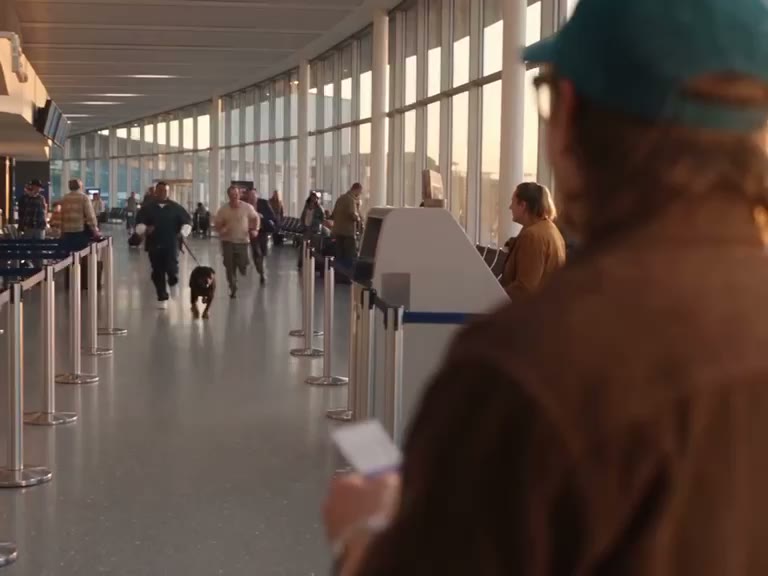
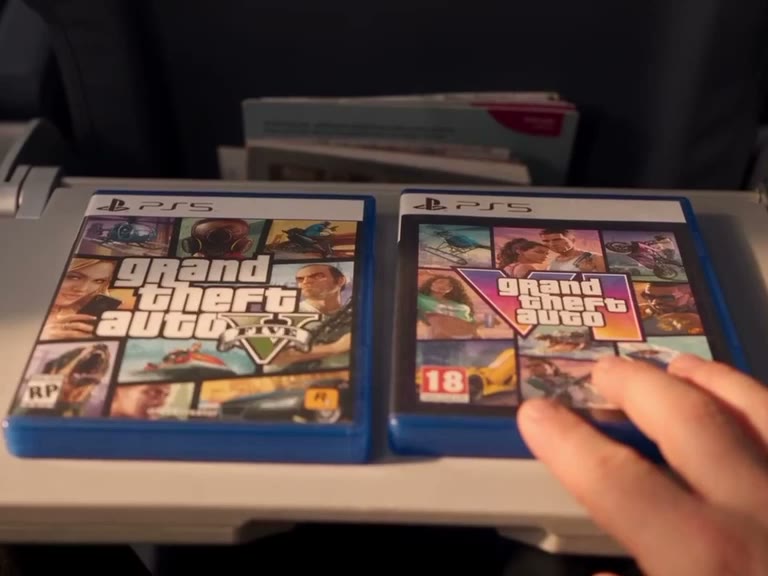
The GTA 5 Airport Goodbye AI reference contains a sequence of actions and camera changes. The traveler meets friends and a dog at the terminal, receives a game case and says goodbye. Later shots show boarding and an airplane taking off. Those beats are already arranged in the source video. You can change the person assigned to the available slot, but this page does not include controls to reposition every camera cut or redesign the performance.

Follow the motion in GTA 5 Airport Goodbye AI

Choose the GTA 5 Airport Goodbye AI reference image

To begin GTA 5 Airport Goodbye AI, pick one clear portrait with the face and hair unobstructed and visible clothing when possible. Select one clearly identifiable subject rather than a crowded collage. A visible face and hair can help preserve recognizable features; including the upper body may give the model more clothing information as the shot changes. Always use an image you are authorized to upload.

A traveler says goodbye to companions and a dog at an airport

Compare GTA 5 Airport Goodbye AI reference lengths

The complete reference is approximately 30 seconds. The short portion concentrates on the greeting before the later flight. For GTA 5 Airport Goodbye AI, Economy and Standard use the prepared shorter segment, while Original follows the full reference. The selected mode affects generation settings and the displayed estimate. Check the duration in the workspace and select the version containing the action most important to you.

Compare GTA 5 Airport Goodbye AI reference lengths

What GTA 5 Airport Goodbye AI carries from the source

The companions, dog, game cases, airport, aircraft and camera cuts come from the supplied video. Your GTA 5 Airport Goodbye AI input guides the traveler; the preset has no separate photo field for every background person or object. The scene still undergoes generative interpretation, and the output may alter expressions, text or props despite these instructions.

What GTA 5 Airport Goodbye AI carries from the source

Assess your GTA 5 Airport Goodbye AI output

Examine the traveler during the greeting and embrace, then inspect the face and game cases in the later views. Review GTA 5 Airport Goodbye AI from beginning to end, paying particular attention to camera changes and contact between hands and objects. Reference sound is configured to be restored during delivery, so play the completed video with audio as well. Select the full mode if the airplane portion is essential to your edit.

A traveler says goodbye to companions and a dog at an airport

GTA 5 Airport Goodbye AI questions

How the reference and photo are used.

How many photos does GTA 5 Airport Goodbye AI need?

One photo is required for the traveler. The reference video is already supplied, so you can preview its movement before adding your image.

Which subject does GTA 5 Airport Goodbye AI replace?

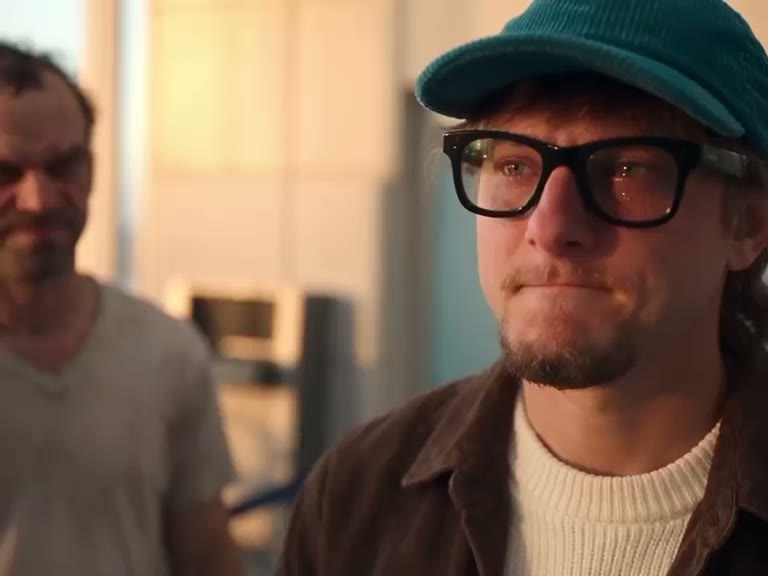
The image guides the traveler originally shown with a teal cap and glasses. Three companions and the dog follow the prepared reference.

What is the short GTA 5 Airport Goodbye AI reference?

Economy and Standard use approximately the first 15 seconds of the terminal meeting and farewell. Economy and Standard use this prepared selection with their respective settings.

What does GTA 5 Airport Goodbye AI Original follow?

Original follows the complete airport story through the later boarding and takeoff shots. The displayed duration is rounded and the resulting video may vary slightly.

Can I control the background in GTA 5 Airport Goodbye AI?

The scene follows the prepared reference, and this page does not provide a separate background selector.

Can GTA 5 Airport Goodbye AI cast every person separately?

The template offers a single photo slot for the traveler. Additional people and props in the source do not have individual upload controls here.

Does GTA 5 Airport Goodbye AI preserve a face perfectly?

The photo guides the subject, but a generated face, hairstyle, clothing or hands may shift between frames. A clear image can help; inspect the final video instead of assuming an exact match.

Does GTA 5 Airport Goodbye AI restore audio?

The prepared reference contains audio and the delivery workflow attempts to restore the selected track. Listen to the completed file and verify your rights before posting it.

How can I improve a GTA 5 Airport Goodbye AI attempt?

Use a sharper photo with a clearly visible subject, verify the role and choose a reference length that includes the moment you need. Check the full output for changes around scene transitions.

What does GTA 5 Airport Goodbye AI cost?

Generating requires an account and available credits. Review the estimate shown for your selected mode and settings before you submit.

Is GTA 5 Airport Goodbye AI an official game?

It is an independent AI video effect featuring a fictional, game-inspired sequence. It is not a playable game and does not imply affiliation with a game publisher.

Where is my GTA 5 Airport Goodbye AI video?

Open My creations after submitting. Once the task finishes, play the video, listen to its sound and use the download control when you are satisfied with the result.

Make GTA 5 Airport Goodbye AI

Add a photo for the traveler and choose a reference length.

A traveler says goodbye to companions and a dog at an airport