
Build a Tiny Desk AI cast that survives every camera cut
A desk-side band edit succeeds when the same characters return after each cut. Start with the people you want to cast, then use a reference performance to give them gestures, instruments and a shared room. You can make a lead-only version or replace selected musicians without staging a real recording.
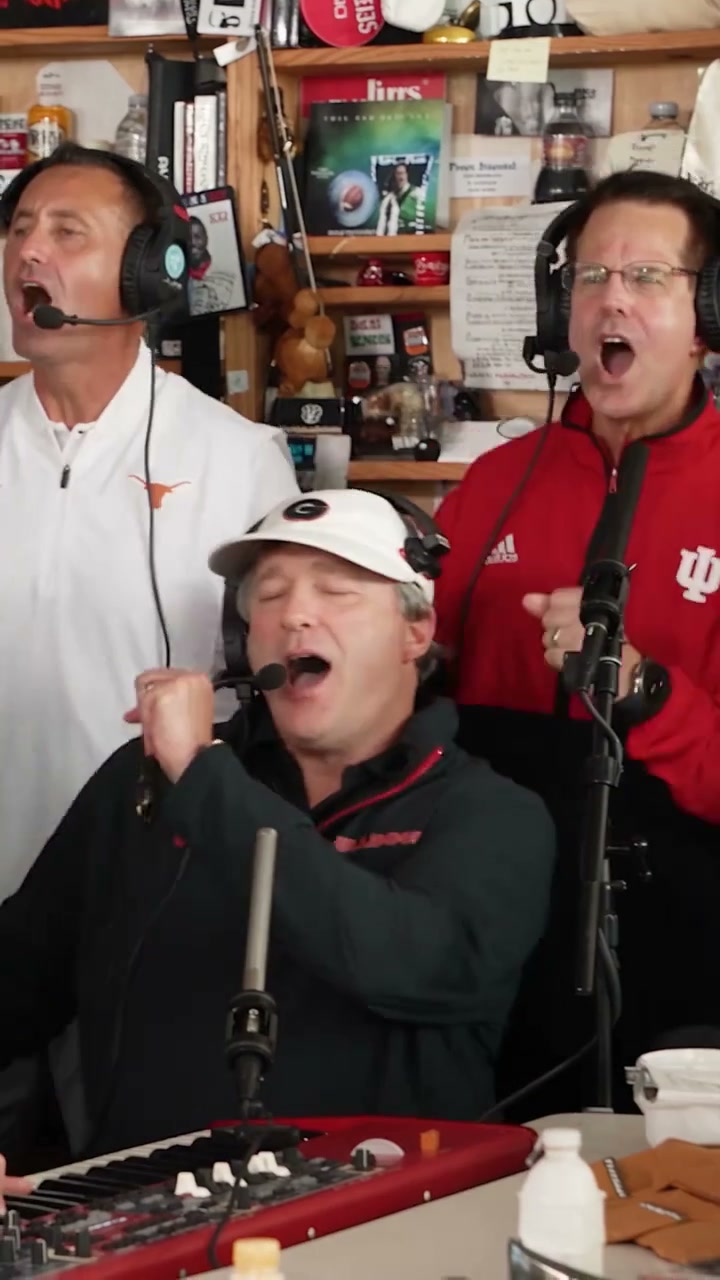
Decide who belongs in your band
For the prepared scene, the red-cap lead is the required role. The four optional parts are the saxophonist in navy and white, the seated keyboard player in a white cap, the white-shirt backing singer on the viewer’s left behind the keyboard and the red-shirt singer on the right. These descriptions identify the source performers; your new cast can wear different clothing.
Save one clear individual image per replacement. A lead portrait needs enough head and shoulder detail for a close-up. Supporting photos should show clothing and body shape. Give nearby singers visually distinct outfits, and avoid collages that force the editor to guess which person belongs to which part.
Choose a performance you can actually edit
Use your own recording or an editable clip supplied with the creator’s permission. Keep a local original with its audio. A clean reference should show the lead, group and instrumental passage without captions or playback controls. To follow those cuts, choose a video editor that accepts an existing video plus multiple character images; a still-image animation tool may invent an entirely different performance.
Check its image limit before preparing five characters. If it accepts fewer, keep a smaller cast and tell it to preserve unassigned performers. The AI Genjutsu template already provides this scene; you do not need to upload another motion clip there.
Give each photo one lasting role
This example replaces the lead and saxophonist. Add a sentence for each additional musician only after attaching that person’s image. If you remove the sax photo, delete its sentence and keep the remaining image numbers consecutive.
Edit @Video 1 as a desk-side band session. Cast @Image 1 as the red-cap lead singer and @Image 2 as the navy-and-white saxophonist. Use their complete appearance, hair, body and clothing in every shot. Preserve all other performers. Follow the lead close-up, instrumental solo and group returns in the reference. Retain the room, shelves, microphones, keyboard and saxophone. Keep each cast member and outfit attached to the same role after cuts; do not duplicate people or exchange their parts.Generate the picture, then check the music
A replacement appearance does not produce that person’s singing voice. Keep the reference soundtrack separate if the editor outputs a silent clip. Use the following sequence in any compatible video-reference workflow.
- Attach the performance video and the labeled character photos. Confirm that the preview shows the intended source and beginning.
- Enter the role prompt and retain the reference framing and duration where the editor allows. Review the cost before submitting.
- Watch the returned video once silently for visual continuity, then with its soundtrack. If silent, place the original audio at the same start point in a timeline editor.
- Export at the source aspect ratio and the chosen output resolution. Replay the exported file locally to check that picture and sound were both included.
Judge the return shots, not just the opening
Pause on the first lead close-up and the later return. Compare hair, collar, accessories and body shape. During the sax passage, look for fingers merging with the instrument or a second mouthpiece. In the group shot, count the performers and check that backing singers remain separate.
If a role changes, first simplify the cast and clarify its label rather than adding many vague quality words. If only an outfit drifts, replace a cropped or ambiguous photo. If sound starts correctly but gradually slips, compare audio and video duration or playback speed; sliding the track cannot fix progressive drift. Results vary, and another attempt does not guarantee an improvement.
Questions before you begin
Can I start with only my own portrait?
Yes. Use it for the lead and explicitly preserve the rest of the band. In the prepared tool, leave all four optional slots empty.
Is this a new song by the person in the image?
No. This workflow changes the visual cast of a reference performance. Recording a new song or voice requires a separate audio production process.