Create a video

Required photos1
Settings
Mode
Video length10s
Resolution

Gamer Dog AI Video Generator

Give your pet the player’s seat in a short gaming-room reaction video.

Gamer Dog AI video ideas

What is Gamer Dog AI?

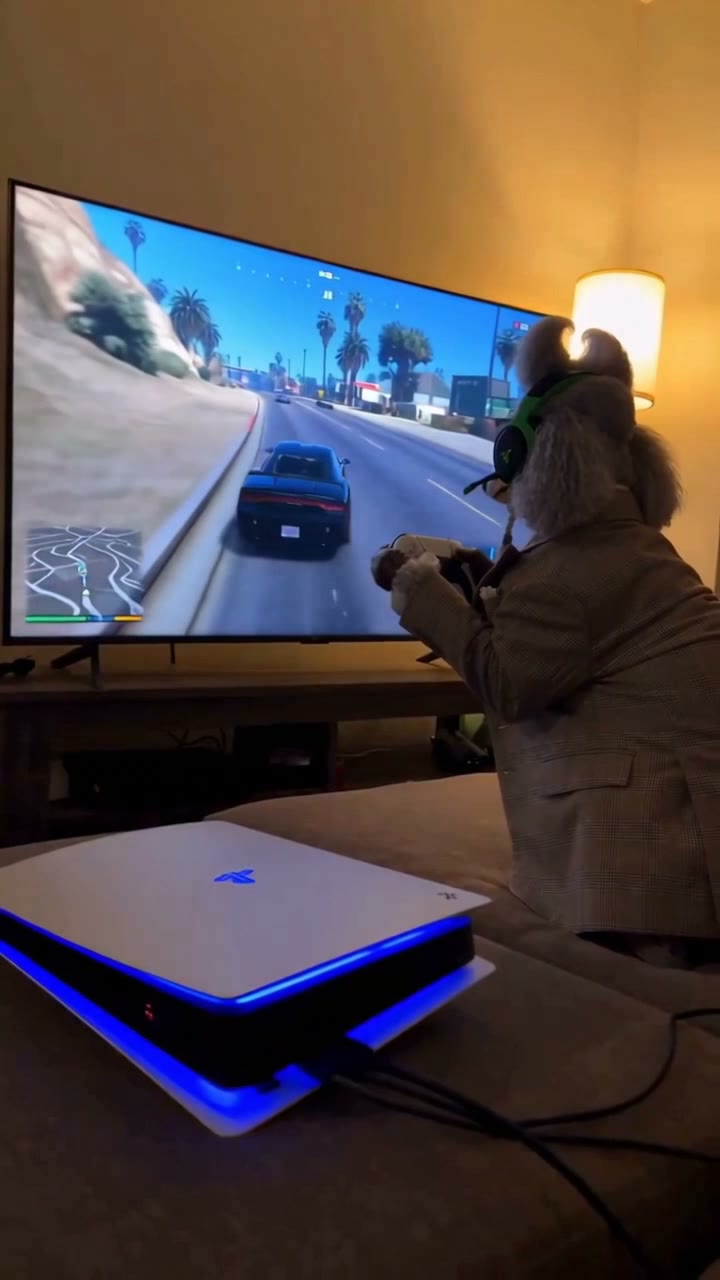
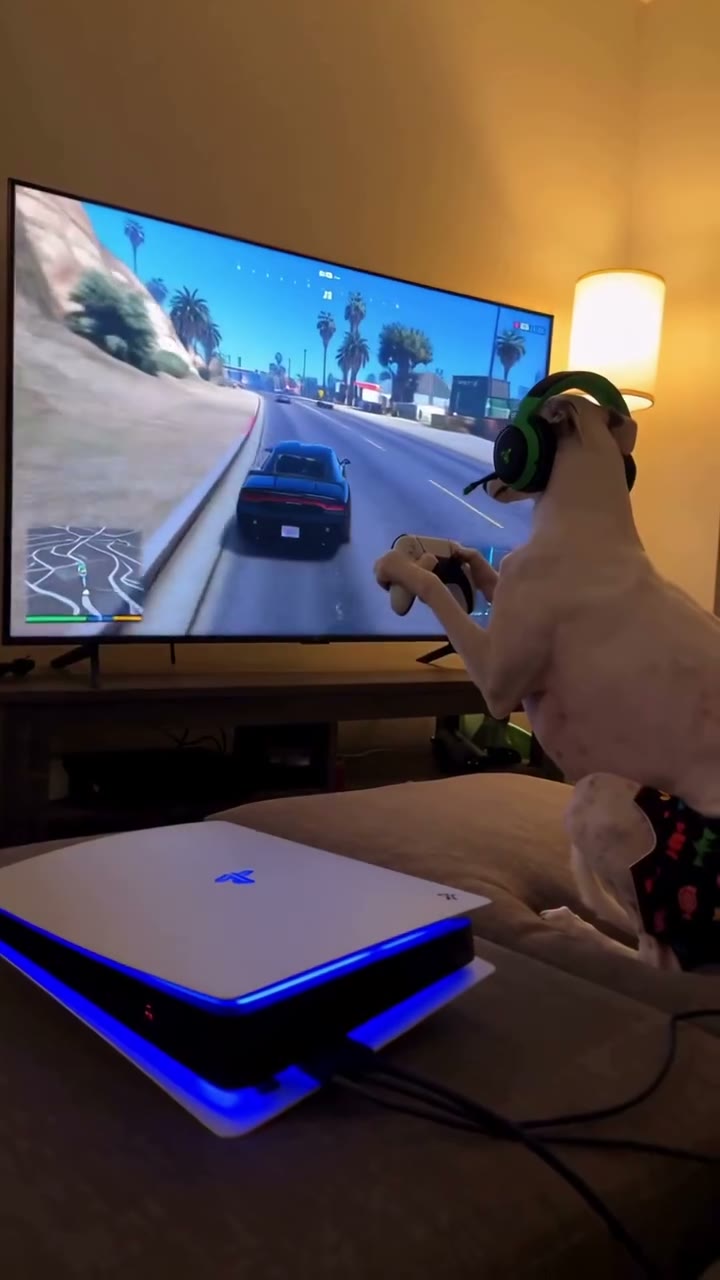
Gamer Dog AI uses a prepared gaming-room video to place a pet in the player’s chair. The reference shows a dog at a television with a controller and headset. After the screen switches off, the animal turns, removes the headset and gets up. One uploaded pet photo guides the featured subject through that sequence. Gamer Dog AI supplies the room, equipment, timing and camera movement. You do not have to film your own pet holding a controller or upload a separate motion video. The result is a generated interpretation of the scene, so appearance and object details can vary. Watch the preview to understand which moments show the pet from behind and when it faces the camera.

Gamer Dog AI example

How to make a Gamer Dog AI video

One pet image starts Gamer Dog AI; the gaming-room movement is already prepared.

  1. STEP 1

    Provide one pet image

    Select a clear, authorized photo of the animal.

  2. STEP 2

    Watch and set the mode

    Preview the Gamer Dog AI gaming motion and check the displayed cost.

  3. STEP 3

    Create the clip

    Inspect the pet’s turn, paws and soundtrack in the finished video.

Explore Gamer Dog AI

Look at how the pet fits into the chair, controller sequence and camera turn.

Prepare a Gamer Dog AI pet image

Choose one image that makes the featured animal easy to identify. For Gamer Dog AI, a clear face, ears and distinctive coat markings are useful cues. A view that includes the body can provide additional context for the wider shot when the pet gets up. Use a photo you are authorized to submit. The Gamer Dog AI source was prepared around a dog’s posture and movements. The slot accepts a pet image, but a different animal may be interpreted differently when it sits in the chair or handles the headset. A sharp individual image gives you a better basis for comparing the output; it does not guarantee an exact coat pattern or anatomy in every frame.
Prepare a Gamer Dog AI pet image

Understand the Gamer Dog AI setup

In Gamer Dog AI, the television, chair, headset and controller are part of the prepared video. The preset does not provide separate inputs for changing the game, uploading a different controller or redesigning the room. Preview the screen change and reaction before choosing the scene for your idea. Some viewers look for Dog Playing GTA AI when searching for a gaming pet clip. Gamer Dog AI creates a fictional reaction video rather than interactive gameplay or an official game feature. The image influences the pet, not the game displayed on the screen. Treat the reference as a fixed performance and decide whether its existing visual joke suits the story you want to make.

Gamer Dog AI example

Inspect your Gamer Dog AI reaction

The source is approximately ten seconds long. Select a mode, review the duration and current estimate in the workspace, and then watch the delivered Gamer Dog AI result from the television shot through the turn and standing movement. Check whether the pet is recognizable after the camera reveals its face. Look closely where paws meet the controller or headset and where the ears meet the equipment. These contacts may shift as the subject moves; coat markings and body proportions can also vary between views. Gamer Dog AI attempts to restore the selected reference audio after the visual step. Listen to the actual output, and review the estimate if you decide to try a clearer photo.

Gamer Dog AI reference

From gamer-dog memes to Gamer Dog AI

Dogs pictured as players appeared in internet memes before this gaming-room video.

  1. An earlier image meme

    Know Your Meme traces a separate image of a headset-wearing dog at a computer to an Imgur post in 2018. Captions later reused it as a joke about gaming. Read the gamer-dog history

  2. A different video setup

    The Gamer Dog AI reference shows a pet in front of a television and a controller, followed by a turn toward the camera. It is a different work from the earlier still-image meme.

  3. Your pet in the scene

    Gamer Dog AI uses one pet photo to guide the player. The screen, room and timing stay with the prepared clip; the first creator of this particular reference is not confirmed.

Gamer Dog AI questions

What do I upload for Gamer Dog AI?

Upload one clear pet photo. The gaming-room motion is already provided, including the chair, screen, controller and the prepared turn toward the camera.

Does the pet need to wear a headset in the photo?

No. Gamer Dog AI uses the headset and gaming props from the supplied reference. A clear view of the animal’s face and ears is more useful for identifying the subject.

Can the photo show an animal other than a dog?

The slot accepts a pet photo, but the fixed source follows a dog’s performance. Another animal may look different in the seated pose or during headset removal.

Is Gamer Dog AI a playable game?

No. It produces a generated video following a prepared scene. The screen content is not interactive, and the effect is independent of any game publisher.

Can I select the game shown on the television?

The screen and its change follow the Gamer Dog AI reference. There is no separate game or screen-content selector for this fixed template.

How long is the gaming reaction?

The source lasts about ten seconds. The workspace shows a rounded duration for the active mode, so play the preview to see the sequence before submitting.

What should I check after generation?

Follow the pet’s face as it turns and inspect the paws, headset and coat markings. Gamer Dog AI can alter small details during fast contact or changing camera angles.

Does Gamer Dog AI provide sound?

The workflow attempts to restore the selected reference audio. Listen to the delivered file rather than assuming its soundtrack is identical to the preview.

Can I cast two pets in the room?

This preset has one required pet-photo role. It does not offer a second slot for another animal or a way to change the supplied room.

How do I see the generation cost?

Review the credit estimate displayed for the selected Gamer Dog AI mode and settings before submitting. Check it again if you change the selection or make another attempt.

Why might my pet look different in the video?

The model has to interpret angles and poses that may not be visible in the photo. Use a well-lit image with recognizable markings and compare the entire result.

Can I change when the screen switches off?

The timing follows the Gamer Dog AI reference. Preview the existing screen change and turn before submitting; this fixed preset does not provide a separate timeline for moving that beat.

Which shot is best for checking the face?

The pet starts facing the television and later turns toward the camera. Review the later Gamer Dog AI frames as well as the opening so you can compare the face and coat with the uploaded photo.

Create with Gamer Dog AI

Preview the gaming reaction and select a pet photo to begin.

Gamer Dog AI example