Create a video

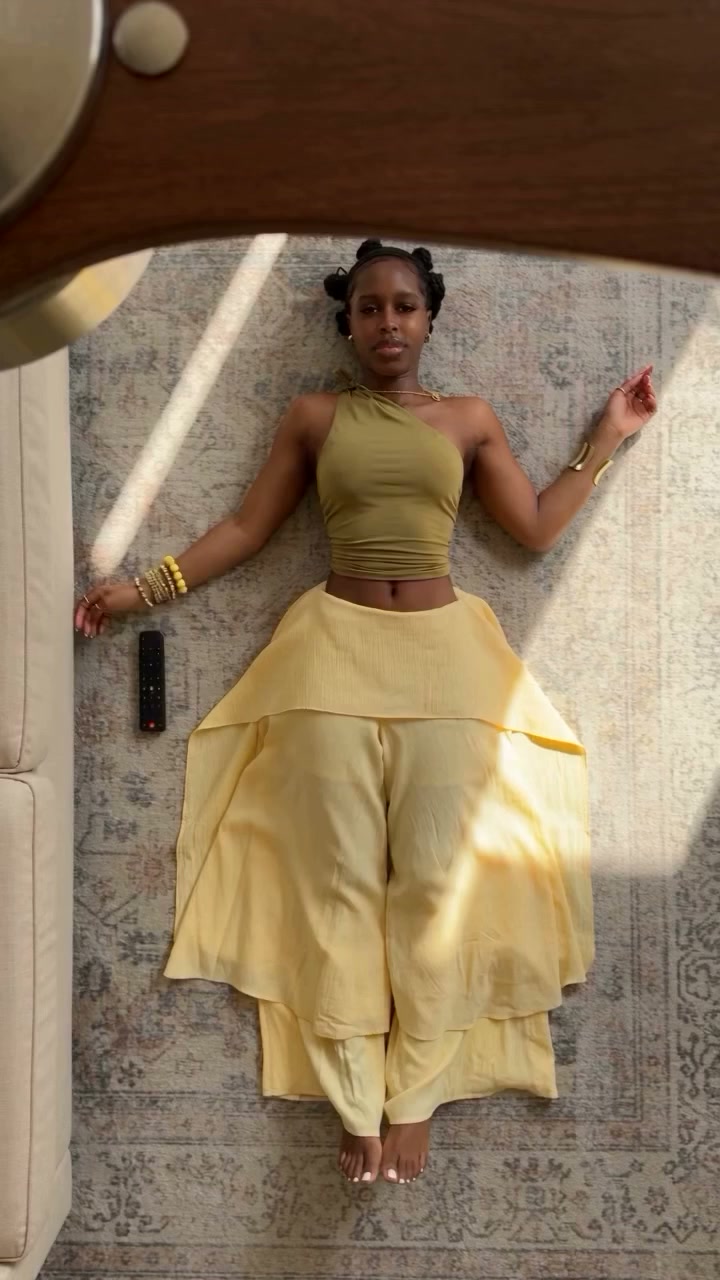
Look 1 · Photo 1
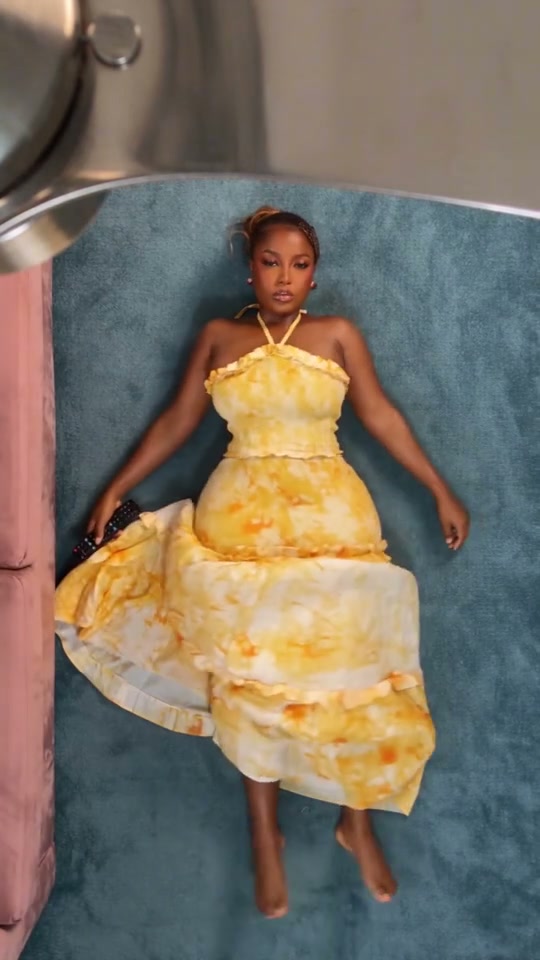
Look 2 · Photo 2
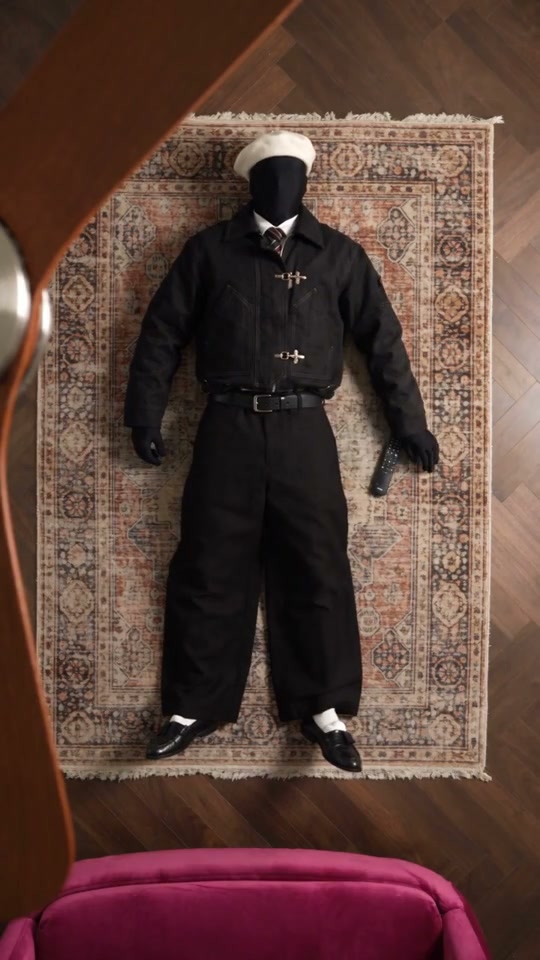
Look 3 · Photo 3
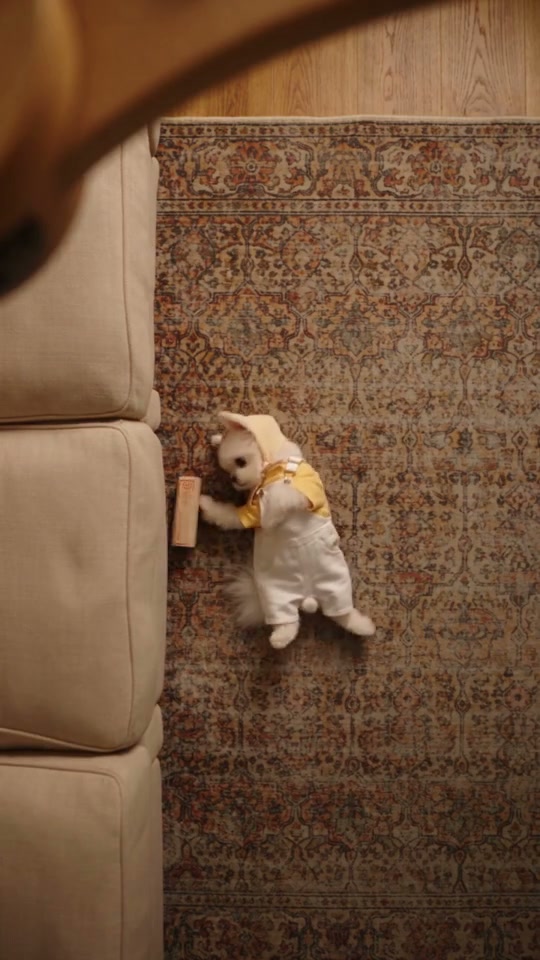
Look 4 · Photo 4

Ceiling Fan AI look order

Ceiling Fan AI is a portrait outfit sequence shot from above. Four photos define four looks in appearance order. The fan, the floor, and the timing come from the reference.

What Ceiling Fan AI is asking you to design

Ceiling Fan AI recreates a short overhead sequence: a person on a carpet, fan blades in the frame, and a run of outfit changes. The reference is a vertical clip of about 15 seconds. Generate shows the quote for this reference at your chosen resolution. Your four photos are not a mood board. Each one is the complete person or pet for one look, in the order that look appears. The source shows a yellow dress, a pink dress, a light sweater with a short skirt, and a green short skirt as the look changes. You do not have to copy those garments. You do have to decide what look 1, look 2, look 3, and look 4 are before you generate. Community examples show other casts in the same overhead idea. They are illustrations, not a guarantee of identical fabric or a perfect blade wipe.

A dress sequence under the fan, used as a Ceiling Fan AI example with sound in the file.

Line up a Ceiling Fan AI sequence

Four pictures, in the order the looks appear. The fan and the room are already in the reference.

  1. STEP 1

    Assign look 1 through look 4

    Upload one complete person or pet per slot. Photo 1 opens the clip. Photo 4 closes it. Include the outfit, face or muzzle, and hair or fur in each file.

  2. STEP 2

    Replace a single look if the order is wrong

    Use Replace on the slot that should change. The other three pictures can stay. Do not reorder by stacking new files after the existing ones.

  3. STEP 3

    Generate, then scrub every change

    Read the credit cost on Generate. In My creations, pause on each outfit change and on the closing pose. A good opening look does not prove that look 3 stayed intact.

Read the Ceiling Fan AI changes, not one poster

Dresses, streetwear, and costumes are different casts of the same overhead timing. Your four photos decide which version you are testing.

Put the four Ceiling Fan AI looks in appearance order

Photo 1 is on screen first. Photo 2 is the next look, then Photo 3, then Photo 4. Ceiling Fan AI does not ask you to label left and right, because the camera is above one performer and the change is temporal. If you swap Photo 2 and Photo 3, the clothes will change in the wrong beat even when every picture is sharp. Use one subject per photo. A contact sheet of all four outfits in a single image does not give the edit four separate looks. Full-body framing helps, because the overhead shot still shows the skirt, sleeves, and feet when the person turns. Hair or fur, face, and accessories belong in the same photo as the clothes for that look. Replacing only Photo 3 is the way to test a different middle outfit without rebuilding the other three.
Put the four Ceiling Fan AI looks in appearance order

Hold each look until the next Ceiling Fan AI cut

The failure mode is a blend, not a bad thumbnail. Look 1 should stay itself until the first change. The yellow-dress beat in the source is only a timing reference. Your Photo 1 should not leak its color into Photo 2 after the change, and Photo 4 should still be the closing outfit when the fan blades cross the final pose. Check the face at each change. An overhead angle hides some features and then reveals them when the person looks up, so identity drift shows up late. Pets can be used in a slot, including a costume, but a pet body will not match a human turn the way a person does. Review paws, tails, and clothing edges separately. The room and the fan stay with the reference. This page does not offer a background upload. The restored soundtrack belongs on the finished file. Use the examples to study cuts, then listen on your own result.

Hold each look until the next Ceiling Fan AI cut

Decide what each Ceiling Fan AI beat is for

The sequence is fixed. The design choice is which appearance owns each beat.

One person, four outfits

Use four photos of the same person in different clothes. Ceiling Fan AI then becomes a wardrobe check: does the face survive while the clothes change on the source beats?

Four different subjects

Give each slot a different person or character you have permission to use. The overhead timing stays. The test is whether the cut actually switches identity instead of blending two faces.

A pet in one or more looks

A pet photo can occupy a slot, costume included. Expect the human choreography to fit a pet body less closely. Check that the pet look still ends when the next photo is supposed to begin.

A Ceiling Fan AI frame checklist

Use the same checks on an example and on your own result.

Order

Look 1, then 2, then 3, then 4, matching the photos rather than the source's yellow, pink, sweater, and green garments.

Boundaries

Each look holds until the next change. Color from the previous outfit should not remain on the sleeves or skirt after the cut.

Identity

Face, hair or fur, and body proportions belong to the photo for that look, including the moment the person looks toward the camera.

Room

The carpet, fan blades, and camera stay with the reference. This preset does not take a separate background plate.

Ceiling Fan AI credits

Generate shows the cost for the resolution you picked. The reference lasts about 15 seconds, and its duration contributes to the quote. Other prices on the page can belong to different tools.

Starter

For your first ideas.

$8.3/month

$100.0 charged yearly

2,400 credits/year

Up to 400 images

GPT Image 2Nano Banana Pro

Up to 133 videos

Seedance 2.5Kling 3.0 Motion Control
  • Up to 4K images and HD videos, depending on the model
  • Image editing, video creation & motion transfer
  • Watermark-free image & video downloads
  • Generation history in your account
Popular40% OFFSave $238.8

Pro

For a steady creative flow.

$30.0/month$49.9/month

$360.0 charged yearly

21,600 credits/year

Up to 3,600 images

GPT Image 2Nano Banana Pro

Up to 1,200 videos

Seedance 2.5Kling 3.0 Motion Control
  • Up to 4K images and HD videos, depending on the model
  • Image editing, video creation & motion transfer
  • Watermark-free image & video downloads
  • Generation history in your account
  • Use credits across image and video models
Best Value50% OFFSave $599.8

Business

For more creations, more often.

$49.9/month$99.9/month

$599.0 charged yearly

48,000 credits/year

Up to 8,000 images

GPT Image 2Nano Banana Pro

Up to 2,666 videos

Seedance 2.5Kling 3.0 Motion Control
  • Up to 4K images and HD videos, depending on the model
  • Image editing, video creation & motion transfer
  • Watermark-free image & video downloads
  • Generation history in your account
  • Use credits across image and video models

Basic

$0

Try before you subscribe

  • 18 one-time signup credits
  • Generation history included
  • Watermarked previews & downloads
  • Up to 3 images or 1 video
  • Watermark-free downloads require payment

Prices in USD; taxes and total shown at checkout. Subscriptions renew automatically; cancel in Billing settings. Subscription credits expire each period; one-time credits never expire. Refund requests: within 72 hours. Eligible refunds deduct used purchased credits and, where permitted, actual non-returned processing fees. Processing fees are capped at 6% of the original purchase amount, excluding separately charged taxes. Terms · Refund Policy.

Ceiling Fan AI questions about looks and cuts

Photo order, pets, length, sound, and what to review.

How many photos does Ceiling Fan AI need?

Four, in order. Photo 1 is the opening look and Photo 4 is the last look. There is no optional fifth picture for a background or an accessory. If a draft has more images than these four slots, remove the extras before you rely on the role order.

Do the photos have to match the dresses in the reference?

No. The reference uses those outfits to mark the beats. Your photos define the clothes, face, hair or fur, and accessories for each beat. A sweater in Photo 3 will not move itself into Photo 1 because the source wears a sweater later.

Can Ceiling Fan AI mix people and pets?

Each slot can be a person or a pet you have permission to edit. A pet in a human dance will not keep human hands or human balance. Look at the costume edges and the body at every cut, not only at the first overhead frame.

Can I change the room or the fan?

Not on this page. Ceiling Fan AI follows the reference camera, the carpet, and the fan. To use a different room you would start from another permitted reference in the main workspace, not by adding a fifth photo here.

Do I need to write a prompt?

No. The instructions and the Seedance 2.5 Edit setup are already attached to the four ordered looks. You choose the photos and a resolution. Drafts keep the pictures you already saved.

How long is Ceiling Fan AI?

About 15 seconds, vertical. The quote depends on the reference duration and resolution. Resolution changes the output size. It does not add another outfit or extend the fan shot.

Is the soundtrack included?

The finished edit restores the reference audio. You do not upload a song. Some examples on the page are picture studies. Confirm sound on the file in My creations. If audio processing fails, use the recovery shown on that result.

What does a failed cut look like?

The previous dress color stays on the next look, two faces overlap at the change, the closing outfit appears early, or the fan blades cover a body that never resolves into Photo 4. Reject that take even if one still frame looks clean.

Where is the download?

My creations in this workspace, or your video history. Downloading an existing result does not start another Ceiling Fan AI job. A new combination of looks is a new request with its own credit cost.

What should I check before posting?

Permission for every person or pet in the four photos, and the fact that the reference footage and soundtrack are not granted to you by this page. Say that the clip is an AI edit when the destination expects that, and follow that site's rules.

Order the four Ceiling Fan AI looks

Photo 1 opens. Photo 4 closes. The fan and the floor stay with the reference.

An overhead view of a person on a carpet with ceiling-fan blades crossing the frame.